


Is IPTV legal in South Africa? The short answer is that IPTV technology is legal, but what you watch has to be properly licensed. This article explains the difference in plain language and how to protect yourself. It is general information, not legal advice. In short: IPTV (Internet Protocol Television) is a delivery technology, while broadcasting in the country is regulated by ICASA. So when people ask “is IPTV legal in South Africa?”, the real question is whether the content is licensed. What Is IPTV? IPTV (Internet Protocol Television) sends TV over an internet connection instead of a dish or aerial. Many legitimate services use it, including broadcasters, telecoms and streaming platforms. The technology is neutral. The legal question is about the content. When Is IPTV Legal in South Africa? IPTV is generally lawful when the provider has the rights to distribute the channels and programmes it sells, through licences from the rights holders. Broadcasting and content distribution in South Africa also operate within the regulatory framework overseen by ICASA. When Can IPTV Be Illegal? Problems arise when a service offers copyrighted channels, sport or films without permission from the rights holder. Under South African copyright law, distributing or communicating protected content without a licence can infringe copyright. Broadcasters and rights holders actively pursue piracy, and there have been enforcement actions in the market. Warning Signs of an Unlicensed Service Prices far below any legitimate package for the same content. Claims of every channel and every sport in the world. No company details, no support and no clear terms. Payment only through unusual or untraceable methods. Sudden service changes or disappearing channels. How to Protect Yourself Ask the provider where its content comes from. Read the terms and billing conditions before paying. Start with a short plan or free trial. Use a payment method that gives you buyer protection. Prefer official apps for live sport you must not miss. Technology vs Content: Quick Comparison Item Legal status IPTV technology and player apps Legal to use Licensed channels from authorised providers Legal to watch Unlicensed copies of protected channels May infringe copyright What Rights Holders Actually License Programmes, sport and films are protected works. A rights holder, such as a broadcaster or a league, decides who may distribute them, in which country and on which platforms. Those rights are often sold separately for each territory and for each type of platform. This is why a channel can be legal to watch on one service and not on another, even when the picture looks identical. Common Myths About IPTV Legality Myth: a VPN makes any stream legal. A VPN protects your connection, but it does not give anyone the right to distribute protected content. Myth: it is legal because it is cheap. Price is not evidence of a licence, although very low prices for premium content are a warning sign. Myth: only the seller is responsible. Enforcement often targets sellers, but using unlicensed services still carries risks, including security and the sudden loss of service. Myth: a free trial proves it is legitimate. A trial is a marketing tool and says nothing about licensing. Questions to Ask an IPTV Provider A transparent provider should be able to answer simple questions without avoiding them: Who is the company behind the service, and where is it based? Where does the content come from? Which channels or sports are included, and do they change often? What are the billing, renewal and refund terms? How can I contact support, and during which hours? If the answers are vague, or you receive no answer at all, treat that as a warning. See also our IPTV subscription guide for what to compare before you pay. Security Risks of Unlicensed Services Beyond the legal question, there are practical risks. Unlicensed services can disappear without notice, which means you lose the money you paid. Fake apps and pages can contain malware, and some collect your payment or personal details. Install apps only from official stores or from sources you trust, and avoid entering banking details on pages you cannot verify. What to Do If a Service Disappears Contact the provider and keep a record of your messages. Check your payment method for dispute or chargeback options. Change any password you reused on the service. Move to a provider that is transparent and offers a trial. Safer Ways to Watch Live Sport For must-watch matches, the safest choice is the official rights holder, which offers its own apps and web players. This is especially true for big events, where a service that fails during the match costs you the most. For rugby specifically, see our guide on how to watch rugby live online in South Africa. What About Players Like IPTV Smarters Pro? Player apps only play whatever playlist you load. The app is not the issue. The source and licensing of the playlist is. See our guide to choosing an IPTV service and compare IPTV providers. Related Guides: Is IPTV Legal in South Africa? How to choose the best IPTV service IPTV providers Channels list Contact us FAQ: Is IPTV Legal in South Africa? Is IPTV legal in South Africa? The technology is legal. A service is lawful when it has the rights to the content it provides. Can I get in trouble for watching IPTV? Enforcement mostly targets sellers and distributors, but unlicensed content carries legal and security risks. Choose transparent providers. Is using IPTV Smarters Pro legal? Yes. It is a player app. What matters is the playlist you load into it. How do I know if an IPTV provider is legitimate? Look for company details, clear terms, a working support channel and honest answers about licensing. Is a free trial legal? A trial is a sales method, not a legal status. The same licensing questions apply to the content in the trial.

How to Watch Rugby Live Online in South Africa (Springboks, URC and More)
A reliable rugby live stream South Africa fans can trust is one of the biggest reasons people look for ways to stream TV. Whether you want the Springboks, the United Rugby Championship or Super Rugby highlights, this guide explains how to watch rugby live online in South Africa, what connection you need and how to avoid unreliable free streams. For official fixtures and broadcast news, check the SA Rugby and United Rugby Championship websites before choosing your rugby live stream South Africa option. Where Rugby Is Broadcast in South Africa Broadcast rights for rugby are held by a small number of sports broadcasters, and the deals change over time. Springbok Tests, the Rugby Championship and the URC (which includes the Bulls, Stormers, Sharks and Lions) have traditionally been shown by pay-TV sports channels, with some matches also available through broadcaster apps. Always check the current rights holder for the competition you follow before you subscribe. Rugby Live Stream South Africa: Ways to Watch Online 1. The official broadcaster app Pay-TV sports broadcasters usually offer an app or web player, so you can watch on a phone, tablet or smart TV without a decoder. This is the most reliable route for live matches. 2. Free-to-air matches Some big matches are shown on free-to-air channels. Check the schedule for your fixture. 3. IPTV with licensed sport channels Some IPTV providers include sports channels. Content licensing differs between providers, so ask where the channels come from and use a free trial first. See our guide to choosing an IPTV service. 4. Official highlights and replays Governing bodies, teams and broadcasters publish highlights and short clips on their official channels. This is a good option if you cannot watch live. Why to Avoid Random Free Streams Many are unlicensed, so they can disappear mid-match. Picture quality and commentary are unpredictable. Pop-ups and fake player pages can carry malware. They can breach copyright rules. What You Need for Smooth Live Rugby Live sport is demanding. Plan for about 10 Mbps for HD and 25 Mbps for 4K, and use a wired connection or 5 GHz Wi-Fi where you can. A Fire TV Stick or Android TV box usually performs better than an old smart TV. See best IPTV for Firestick. During load shedding, a small UPS for the router keeps the stream going. Rugby Live Stream South Africa: Match-Day Checklist Check the kick-off time (SAST) and the broadcaster. Log in to your app at least 30 minutes early. Restart your router and streaming device before the match. Close other apps that use bandwidth. Have a backup, such as a phone hotspot, ready. Rugby Competitions to Know Different competitions have different broadcasters, schedules and kick-off times, so it helps to know what you are looking for. The Rugby Championship: the Springboks play Australia, New Zealand and Argentina in the southern hemisphere. Test series and end-of-year tours: Springbok matches against northern hemisphere sides, mostly in June, July and November. United Rugby Championship (URC): the league that includes South African clubs alongside teams from Ireland, Wales, Scotland, Italy and elsewhere. Currie Cup: the domestic competition between provincial sides. Rugby World Cup: played every four years, with the biggest audiences. Fixtures change from season to season, so always confirm dates and broadcasters on the official competition website. Kick-Off Times and Time Zones Many Springbok Tests are played overseas, so kick-off can be in the early morning or late evening in South Africa. Always check the time in SAST rather than the local time of the host country. Set a reminder on your phone and log in to your app 30 minutes early so that updates, sign-in screens or buffering do not cost you the opening minutes. How Much Data Does a Rugby Match Use? A match runs for about two hours, and with build-up and analysis it often reaches three hours. At roughly 1.5 to 3 GB per hour for HD, that is about 4.5 to 9 GB for one match. If you use a capped LTE or 5G line, plan this in advance, and avoid 4K unless you have a large or uncapped package. Building a Match-Day Streaming Setup Use a cable if possible. Connect your TV box or stick to the router with Ethernet. Keep the router near the TV if you must use Wi-Fi, and use the 5 GHz band. Update your apps the day before, not on match day. Pause other downloads on phones, consoles and computers at home. Prepare a backup: a phone with a data bundle and hotspot turned on. Plan for power: a small UPS for the router can save the second half during load shedding. Common Match-Day Problems Problem Quick fix Stream freezes Lower the quality setting, switch to Ethernet, restart the app Picture is behind the radio or social media Normal streaming delay, avoid spoilers by muting notifications App will not log in Check your subscription, restart the device, reinstall if needed Sound but no picture Restart the player and check your HDMI connection Replays, Highlights and Short Clips If you miss a match, official channels from the competition, the teams and the broadcasters usually publish highlights soon after the final whistle. These are safe, free and legal to watch, and they are ideal on a limited data plan because short clips use far less data than a full game. More Guides for South African Viewers IPTV subscription in South Africa: plans and free trial Is IPTV legal in South Africa? Channels list Best IPTV for Firestick Test Before the Big Game If you are trying IPTV for sport, request a free trial and test it on a weekend fixture before relying on it for a Springbok Test. FAQ: Rugby Live Stream South Africa How can I watch the Springboks online? Check the official broadcaster for the match and use its app or web player. Some matches are also shown on free-to-air channels. Can I watch the URC online in South Africa? Yes, through the rights holder in South
IPTV Subscription South Africa 2026: Plans, Free Trial and What to Check
An IPTV subscription South Africa viewers can rely on is a flexible way to watch live TV over your fibre, LTE or 5G connection. But plans, trials and quality vary a lot between providers. This guide explains how subscriptions work, what to compare and how to test a service before you commit. New to the technology? IPTV (Internet Protocol Television) sends TV over your internet line, and broadcasting in South Africa is regulated by ICASA. Use this guide to compare any IPTV subscription South Africa provider before you pay. How an IPTV Subscription South Africa Plan Works When you subscribe, the provider gives you login details or a playlist link. You enter them in a player app such as IPTV Smarters Pro or TiviMate on a Fire TV Stick, Android TV box, smart TV or phone. The app then loads the channels and TV guide. You do not need a satellite dish or a decoder. What to Compare Between IPTV Plans Duration: monthly, quarterly or yearly. Start short until you trust the service. Number of connections: how many devices can watch at the same time. Channels and sport: check the channels list against what you really watch. Quality: HD or 4K, and whether it holds up in the evening. Renewal and cancellation: know the date and the rules in advance. Support: a way to reach a real person in South African hours. IPTV Free Trial: Why It Matters An IPTV free trial or short test lets you check stability and picture quality on your own connection. It is the single best protection against paying for a service that buffers. You can request one on our free trial page. How to use a trial properly Install your player app first, so no trial time is wasted. Test in the evening and on a sports day. Switch between channels and check the guide. Test on every device you plan to use. Ask support a question and see how fast they reply. What You Need on Your Side Plan for about 10 Mbps per HD stream and 25 Mbps for 4K. Uncapped fibre is the safest option. On capped LTE or 5G, remember that HD streaming can use roughly 1.5 to 3 GB per hour. A small UPS for your router helps during load shedding. For device ideas, see best IPTV for Firestick. IPTV Subscription South Africa Checklist Question Why it matters Is there a trial? Lets you test before paying Is pricing clear? Avoids surprise renewals How many devices? Matches your household Is support reachable? Fixes problems quickly Choosing the Right Plan Length Longer plans usually cost less per month, but they also lock in your money. If you are new to a provider, start with a short plan and move to a longer one only after the service has proved itself over several weeks, including a weekend with live sport. Plan length Best for Watch out for 1 month Testing a new provider Higher monthly price 3 to 6 months Settled households Check refund rules 12 months Long-term users of a proven service Large upfront payment How Many Connections Do You Need? A connection is one device watching at the same time. Count the screens that may run together in the evening, not the devices you own. A couple usually needs one or two connections, while a family with teenagers may need three or four. More connections also mean more bandwidth: each HD stream needs about 10 Mbps, so check that your line can carry them all. Payment and Security Basics Use a payment method that offers buyer protection. Keep your receipt and the plan details in writing. Never share your login details outside your household. Be careful with sellers who only accept unusual payment methods. After You Subscribe: Setting Up in 6 Steps Open your confirmation email and keep the login details safe. Install a player such as IPTV Smarters Pro or TiviMate. On a Windows laptop you can also read our STBEmu guide. Enter the server, username and password, or the playlist link. Let the channel list and TV guide load fully the first time. Create favourite lists for the channels you really watch. Test on every device and note any problem to send to support. Troubleshooting Your First Week Problem What to try Channels buffer Restart the router, switch to Ethernet or 5 GHz Wi-Fi Login fails Check spelling, spaces and the server address No TV guide Refresh the EPG and wait a few minutes Audio out of sync Change the player setting or restart the stream If the problem continues, send support a short message with your device, app and the time it happened. You can reach us through the contact page. Where to Compare Next IPTV pricing and cheap IPTV plans Customer reviews How to choose the best IPTV service Is IPTV legal in South Africa? Rugby live stream in South Africa IPTV Providers vs IPTV Service: What Is the Difference? People often use these words as if they meant the same thing. An IPTV provider is the company you buy from. An IPTV service is what you actually receive: the channels, the servers, the guide, the apps and the support. A good provider delivers a good service, but you can only judge that by testing it. What an IPTV service should include A channels list that matches what your household watches. Stable streams in the evening and on match days. A working TV guide (EPG) and favourites lists. Support apps and clear setup instructions for your device. Straightforward renewal, cancellation and refund terms. How to compare providers fairly Request a trial from each provider and test on the same device. Use the same channels and the same time of day for every test. Send each provider the same support question and compare replies. Compare the full price per month, not only the headline offer. You can see how we present our options on the IPTV providers page and the channels list, and read our

Best IPTV Services in 2026: How to Choose
The best IPTV service 2026 is not the one with the longest channel list or the lowest price. It is the one that is legal where you live, stable on your device and honest about what you actually get. This guide gives you a practical checklist to compare providers, test them before you pay and avoid the most common traps. IPTV simply means television delivered over the internet instead of through an aerial, satellite dish or cable. Legitimate IPTV exists, from public broadcasters’ apps to licensed live TV bundles. The problem is that the term is also used by unlicensed services, and from the outside the two can look alike. Knowing the difference is the first step to finding the best IPTV service 2026 has to offer. What makes the best IPTV service 2026? When people search for the best IPTV service 2026, they usually want the same five things: channels they actually watch, a picture that does not freeze, a service that works on their device, help when something breaks and a fair price. No provider can promise all of this to everyone, because results depend on your internet connection, your location and the rights the provider holds. That is why a method matters more than a ranking. Lists of “the top 10” are often written by the sellers themselves, so use the checks below to judge any service, including ours. Check 1: Is the best IPTV service 2026 legal where you live? This comes first, and it is the one most buyers skip. Streaming copyrighted channels without a licence can be a criminal or civil matter depending on the country, and rules differ widely. In the UK, the Federation Against Copyright Theft (FACT) reported in December 2025 that it had sent more than 1,000 warning letters to viewers of illegal IPTV services, as reported by Choose. Enforcement is no longer aimed only at sellers. Not sure where you stand? Read is IPTV legal in South Africa for the difference between licensed and unlicensed content. We cannot give legal advice, and we cannot tell you that a particular service is lawful in your country. What you can do is ask the provider which broadcasters or rights holders it has licences from, read its terms and check the laws that apply to you. If the answer is vague, or the price looks far too low for hundreds of premium channels and every sports event, treat that as a warning sign. For more on this topic, read our guide on how to find the best IPTV provider. Check 2: Does it work on your device? A service is only good if it runs on the screen you own. Most providers work with an IPTV player app, which only displays what your subscription provides and includes no channels itself. Before you pay, confirm that your device can run a player that supports your provider’s format, usually an M3U link or Xtream login details. Devices are not equal here. Older Fire TV sticks run Fire OS and can install apps from outside the Amazon Appstore, while newer sticks running Vega OS only allow Appstore apps, as AFTVnews explains. Our Firestick IPTV guide covers which models work. Smart TVs, Android boxes, phones and tablets usually have their own player options, so check your exact model. Check 3: Is it stable at busy times? Almost any service, including the best IPTV service 2026 candidates on your shortlist, looks fine at 10 a.m. on a Tuesday. The real test is a Saturday evening or a major match, when thousands of people watch at once. Stability depends on the provider’s servers, but also on your side: Wi-Fi strength, router quality and even your DNS. A wired connection or 5 GHz Wi-Fi removes many problems before you blame the provider. If buffering is frequent, our DNS benchmark guide shows how to test alternatives. As a rough guide, standard definition needs a few megabits per second, full HD needs more and 4K needs a fast, steady connection. Run a speed test on the same device you will use for TV, not on your phone next to the router. Check 4: Is the channel list described honestly? Be careful with big numbers. “20,000 channels” usually counts every duplicate, radio station and on-demand title, not the channels you will watch. Instead of the total, ask whether the specific channels you care about are included, in which quality, and whether they come with a programme guide (EPG). Do not accept a promise that a channel will be added later; subscribe only for what is confirmed today. Our channels list shows how we describe what is available, and you can ask any provider for the same level of detail. A trustworthy seller will say clearly what is not included, and that honesty is what separates the best IPTV service 2026 from a flashy sales page. Check 5: Can you reach support? Problems happen with every service: a login stops working, a channel goes down, an app needs updating. What separates a good provider from a poor one is how quickly someone answers, so support belongs in any best IPTV service 2026 comparison. Before buying, send a question through the contact form, WhatsApp or email and see how long the reply takes and whether it is useful. If nobody replies before you have paid, nobody will reply afterwards. Check 6: Are the price and payment terms fair? Compare the cost per month, not the headline price, when you weigh the best IPTV service 2026 options. A 12-month plan that looks cheap is a poor deal if the service disappears after two months. Look at what the plan includes, how many connections you get at the same time and whether renewal is automatic. Prefer payment methods that offer some buyer protection, and keep your receipt. Our IPTV pricing page shows how plans are laid out, so you can compare like with like. Planning to buy? Our IPTV subscription guide for South Africa explains plan
Best IPTV for Firestick: How to Choose and Set Up
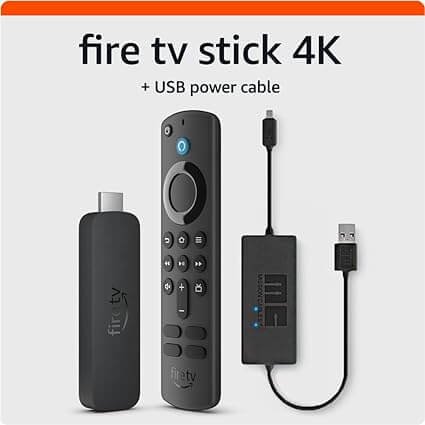
The best IPTV for Firestick starts with the right stick: not every Fire TV Stick can run an IPTV app, and the model you own decides how easy the setup is. This guide shows which Firestick to use, how to install an IPTV player, how to add your subscription and what to do when something goes wrong. A Firestick turns any HDMI TV into an IPTV screen. Which Fire TV Stick works with IPTV apps Amazon now sells two kinds of Fire TV Stick. Older models run Fire OS, which is based on Android and can install apps from outside the Amazon Appstore. Newer models, starting with the Fire TV Stick 4K Select released in October 2025, run Vega OS and only allow apps from the Amazon Appstore. On those sticks you cannot sideload an IPTV player. System Models (check the product page before buying) Install apps from outside the Appstore Fire OS Fire TV Stick 4K Max, Fire TV Stick 4K, Fire TV Cube, first-generation Fire TV Stick HD Yes Vega OS Fire TV Stick 4K Select and the newer Fire TV Stick HD No To check a stick you already own, open Settings > My Fire TV > About. A software version that starts with “1.” means Vega OS. Details are on AFTVnews, which tracks which models are affected. Fire OS Based on Android Apps from the Amazon Appstore Apps from outside the Appstore, with Downloader Fire TV Stick 4K Max, 4K, Cube, first-generation HD Vega OS Amazon Appstore only Apps from the Amazon Appstore No apps from outside the Appstore Fire TV Stick 4K Select and the newer Fire TV Stick HD What you need before you start For the best IPTV for Firestick experience, prepare these four things first. n A Fire TV Stick that runs Fire OS, or a Vega OS stick if your player app is available in the Amazon Appstore. A stable internet connection. Use 5 GHz Wi-Fi or an Ethernet adapter if you can. An IPTV subscription, with an M3U link or Xtream login details from your provider. An IPTV player app. The player only displays channels; it does not include any, so the best IPTV for Firestick still needs a subscription. If you do not have a subscription yet, compare options on our IPTV pricing page, or read how to find the best IPTV provider first. Step 1: Choose an IPTV player app A good player handles your M3U or Xtream details, shows a programme guide and does not crash on a long channel list. IPTV Smarters Pro and TiviMate are two widely used choices, and you can try more than one. Pick the app, then check whether it is listed in the Amazon Appstore for your stick. In practice, the best IPTV for Firestick is a reliable subscription paired with a stable player app. Step 2: Install the app Install the best IPTV for Firestick app from the Amazon Appstore Search for the app name on the Fire TV home screen, open its page and select Get. This works on every Fire TV Stick. If the app is not in the Appstore (Fire OS only) Install the Downloader app from the Appstore. Go to Settings > My Fire TV > Developer options. If you do not see Developer options, open About and press the device name seven times. Open Install unknown apps and turn it on for Downloader. Open Downloader, enter the app developer’s official download address and install the file. Only download apps from the developer’s own website, and never install a file from a link you do not trust. Step 3: Add your IPTV subscription Open the player app and choose to add a new playlist or login. Pick M3U URL or Xtream codes, depending on what your provider sent you. Enter the details exactly as given. Copy and paste them from a phone message if typing is slow. Wait for the channel list to load. A large list can take a minute. Tips for the best IPTV for Firestick streaming For the best IPTV for Firestick picture, restart the stick from time to time and keep its software up to date. Keep the stick away from heat and plug it into a power adapter, not the TV’s USB port, if it reboots by itself. Avoid downloads on other devices during live sport. If channels buffer, try a different DNS. Our DNS benchmark guide explains how. Common problems and fixes The app will not install If the best IPTV for Firestick will not install, check that your stick runs Fire OS if you are installing from outside the Appstore, and that Downloader has permission to install unknown apps. Want to watch rugby on your stick? See our rugby live stream in South Africa guide for official options and a match-day checklist. The login is rejected Check for spaces at the start or end of the link or code, and confirm the details with your provider. The channels freeze on Firestick Test your connection speed, move closer to the router or use a cable, then restart the app. If it keeps happening, contact your provider. There is no programme guide Some apps need an EPG address added in their settings. Ask your provider for it. Other devices The best IPTV for Firestick also works on most Android boxes, using the same steps. No Firestick? For a smart TV, see our guide to IPTV on a Samsung Smart TV, or our guide to STBEmu on a Windows laptop. Ready to choose a service? Browse our IPTV providers and reseller panels.

IPTV Romania in UK: Stream Your Favourites Easily
Are you missing the comforting embrace of Romanian television while living in the UK? With the rise of IPTV (Internet Protocol Television), accessing your favourite Romanian TV channels from abroad has never been easier. Whether you’re looking for the best IPTV service in the UK or simply want to watch Romanian TV online UK, this modern alternative offers flexibility and convenience tailored to the Romanian community in the UK. Let’s dive into how IPTV can transform your viewing experience and keep you connected to your roots. Key Takeaways IPTV provides a convenient solution for accessing Romanian content in the UK. With a variety of options, you can find the best IPTV service in the UK for your needs. Streaming Romanian TV online UK allows for easy placement of your favourite shows and channels. IPTV’s flexibility means you can watch content on multiple devices. Stay connected to your culture and news from Romania through diverse programming. What is IPTV and How Does It Work? IPTV, or Internet Protocol Television, represents a modern way to access televised content using an internet connection. This technology allows viewers to stream their favourite shows and channels in real time or on-demand, providing a flexible and user-centric viewing experience. For those wondering how to watch Romanian TV in the UK, understanding the basics of IPTV is essential. Understanding the Basics of IPTV IPTV operates by delivering television programming through internet protocols instead of traditional satellite or cable methods. Users can engage with content in two primary formats: Video-on-Demand (VOD): This allows viewers to select specific programmes to watch at their convenience. Live Streaming: Users can tune into channels as the content airs, mirroring traditional TV experiences. This combination of flexibility and ease makes IPTV an attractive option for those looking for iptv subscriptions UK that include Romanian channels. By harnessing the power of the internet, viewers gain access to a plethora of options tailored to their preferences. The Technology Behind IPTV Streaming To enjoy the full benefits of IPTV, a reliable broadband internet connection is necessary. High-speed internet ensures smooth streaming without interruptions. Key technologies involved in IPTV streaming include: Compression techniques that optimise video quality while reducing bandwidth use. Streamlining protocols that help in efficient transmission of data. Standard streaming methods that guarantee stability and performance, enhancing the user experience. As one navigates iptv subscriptions UK, understanding these technical aspects can greatly enhance the overall experience of watching Romanian content in a convenient format. Why Choose IPTV for Romanian Content in the UK? Opting for IPTV for Romanians in the UK offers a range of benefits that traditional media often cannot match. The ability to access a vast selection of Romanian channels provides users with an enriching viewing experience tailored to their interests. With numerous romanian iptv providers available, the choice of content is extensive, ensuring there is something for everyone. Extensive Channel Selection IPTV allows access to a broad array of Romanian channels, covering everything from news and entertainment to sports and cultural programming. This variety includes popular Romanian broadcasts, making it easier for viewers to keep up with their favourite shows and events from home. The diverse range of channels offered by romanian iptv providers ensures that anyone living in the UK can find programming that resonates with their tastes and preferences. Flexibility and Convenience With IPTV, flexibility stands out as a notable advantage. Subscribers can enjoy their favourite Romanian content on multiple devices, including smart TVs, tablets, and smartphones. This convenience allows for viewing on the go, empowering users to watch shows whenever and wherever they prefer. There are no geographical constraints, making IPTV for Romanians in the UK a practical choice for those wishing to remain connected to their roots while adapting to a new environment. IPTV Romania in UK: Popular Romanian IPTV Services Available For viewers in the UK interested in Romanian content, choosing the right IPTV service is crucial. Several providers stand out in the realm of Romanian IPTV, offering a variety of channels and features. Understanding these options can enhance your viewing experience and ensure you receive quality service. Top Providers to Consider Numerous popular IPTV services cater to the Romanian audience in the UK. Here are a few worth considering: Perfect IPTV: Known for its vast selection of channels, this service offers an easy-to-navigate interface and reliable streaming, making it a favourite among viewers. RTP TV: Features a mix of Romanian and international channels, RTP TV provides flexible subscription options tailored to viewer needs. DNA IPTV: This provider offers a comprehensive package of Romanian entertainment, including sports, movies, and news, often regarded for its excellent customer support. Subscription Options and Pricing Understanding the subscription plans available can help you budget effectively. Most popular IPTV services offer several tiers, including: Monthly Subscription: Ideal for casual viewers, this option allows flexibility without long-term commitment. Quarterly Subscription: For those looking to save a bit more, quarterly plans often come at a reduced rate compared to monthly pricing. Annual Subscription: This usually provides the best value, with significant savings compared to monthly payments. Prices for these services typically range from £5 to £30 per month, depending on the channel selection and additional features, such as on-demand content and cloud recording. Evaluating these costs against the offerings of each service can help potential subscribers choose the best fit for their viewing preferences. Investing in the right romanian iptv box uk can enhance this experience by ensuring compatibility and optimal performance. Setting Up IPTV in the UK: A Step-by-Step Guide Setting up IPTV in the UK can seem daunting, but with the right equipment and a clear installation process, it’s much more manageable. This guide breaks down everything you will need and provides straightforward steps to ensure you can enjoy your favourite Romanian channels without any hassle. Equipment You’ll Need To get started with your IPTV subscriptions in the UK, ensure you have the following equipment: Smart TV with built-in app support Streaming devices like Roku or Amazon Fire Stick Dedicated IPTV

IPTV Bulgaria: Watch Bulgarian TV Channels in the UK and Abroad
Have you ever wondered how a simple service can unlock a world of entertainment right from the comfort of your home? With IPTV Bulgaria, the boundaries of traditional viewing are being redefined, enabling users to watch Bulgarian channels online and access a plethora of global content like never before. This innovative Bulgarian IPTV service has gained traction, offering an extensive range of local and international channels, which challenge conventional cable offerings. As we dive into the benefits and features of IPTV Bulgaria, you’ll discover why it’s considered the best IPTV provider in Bulgaria. Key Takeaways IPTV Bulgaria offers a diverse selection of global and local content. This service provides flexibility in accessing channels and shows. IPTV Bulgaria is comparatively cost-effective against traditional cable services. Enjoy high-quality streaming experiences tailored to individual preferences. Discover how easy it is to set up and enjoy IPTV services. What is IPTV and How Does it Work? IPTV, or Internet Protocol Television, represents a modern method of delivering television content through the internet. This innovative technology brings a wealth of programming directly to users’ devices, paving the way for an engaging viewing experience. Definition of IPTV At its core, IPTV translates television programming into digital signals sent via the internet. Users can watch shows and films via streaming without the need for traditional cable or satellite services. This direct access enables immediate enjoyment of content from the comfort of their homes. How IPTV Differs from Traditional TV Unlike traditional television, which operates on fixed schedules imposed by broadcasters, IPTV offers on-demand options. With an iptv subscription bulgaria, viewers can select what to watch at their leisure. This flexibility marks a significant shift in how users engage with television programming, allowing for a tailored viewing experience. Benefits of Choosing IPTV The appeal of choosing IPTV includes a variety of significant advantages: Access to a larger selection of channels, including local and international content. Cost-effectiveness, often providing more affordable options over conventional services. Convenience of streaming services, which integrate seamlessly with modern devices. Greater flexibility, ideal for bulgarian tv streaming preferences. These benefits make IPTV an increasingly popular choice for entertainment, catering specifically to the evolving needs of viewers today. Why Choose IPTV Bulgaria? IPTV Bulgaria offers an outstanding viewing experience that appeals to a wide audience. With a variety of options available, users can enjoy an expansive range of content tailored to their preferences. The innovative technology employed ensures smooth, high-quality streaming that enhances the enjoyment of both local and international content. Diverse Content Offerings The selection of IPTV Bulgaria channels makes it an attractive choice for viewers seeking both local and global entertainment. Users can access numerous genres, ensuring there is something for everyone. From Bulgarian dramas to international news, the content library caters to a diverse audience. High-Quality Streaming Experience One of the standout features of IPTV Bulgaria is its commitment to delivering a high-quality streaming experience. With the right IPTV box for Bulgaria, users can enjoy crystal-clear images and minimal buffering. This technological prowess ensures that fans of live sports and action films can view their favourite content seamlessly. Cost-Effectiveness Compared to Other Services Opting for Bulgaria IPTV packages can be a cost-effective solution for many households. With competitive pricing models, subscribers can access a comprehensive range of channels without the steep costs associated with traditional cable services. This value makes IPTV Bulgaria a smart choice for families and individuals alike. Getting Started with IPTV Bulgaria Embarking on your journey with IPTV Bulgaria is an exciting venture that opens the door to a wealth of entertainment. To begin, you’ll need some essential equipment and an understanding of the available subscription options. Once you have that in place, setting everything up becomes a straightforward task. Required Equipment and Setup The primary requirement for enjoying IPTV Bulgaria is a stable internet connection. Ideally, your connection should be at least 10 Mbps for seamless streaming. You can use various compatible devices, such as: Smart TVs Set-top boxes Mobile devices Each option provides flexibility in how you choose to watch your favourite shows. The setup process generally requires minimal technical knowledge, making it accessible for everyone. Subscription Plans and Pricing When exploring IPTV subscription Bulgaria, you’ll encounter various plans tailored to different viewing preferences and budgets. These plans typically range from basic offerings, which include essential channels, to premium packages featuring extensive channel selections and extra content. Carefully consider the options to find a plan that matches your viewing habits while ensuring cost-effectiveness. Installation Process Overview Getting started with the IPTV app Bulgaria involves a simple installation process. Begin by downloading the IPTV app from a trusted source. Once downloaded, you will need to configure settings according to your chosen subscription plan. Should you encounter any challenges during the installation, customer support can provide assistance to ensure a smooth setup. Popular Channels and Content Available IPTV Bulgaria boasts a wide array of channels and content that caters to various viewing preferences. Users can enjoy a seamless experience with access to beloved local Bulgarian channels, as well as a collection of international networks and sports events. This diverse selection makes it easy for anyone looking to stay entertained and informed. Local Bulgarian Channels One of the standout features of the Bulgarian IPTV service is its robust lineup of local channels. Viewers can watch Bulgarian channels online that focus on news, cultural programming, and popular entertainment. This ensures that audiences remain connected to the heart of Bulgarian life, no matter where they are. International Networks and Movies The platform also includes various international networks, offering a global perspective on entertainment. Users can explore numerous films and series from different countries, providing a rich tapestry of choices that cater to diverse tastes and preferences. Sports and Live Events Coverage Sports lovers will find an extensive range of coverage for live events, including football matches, tennis tournaments, and much more. This feature allows fans to partake in their favourite sports from the comfort of their homes, making the Bulgarian IPTV service a popular choice among sports enthusiasts. User Experience and Interface of IPTV Bulgaria The user experience on the IPTV Bulgaria platform prioritises

Stream with Ease: STBEmu on Windows Laptop
Have you ever wondered why your streaming experience can be filled with interruptions and frustration? It doesn’t have to be this way! Introducing STBEmu, a revolutionary application designed to provide seamless streaming on your Windows laptop. This guide aims to enlighten you about the installation and configuration of STBEmu, ensuring you can maximise its potential for an enjoyable viewing experience. With a user-friendly interface and extensive content options, STBEmu sets the stage for hassle-free streaming on your Windows laptop. Let’s dive into the world of stb emulator installation and discover how to elevate your streaming on stbemu. Key Takeaways STBEmu offers a user-friendly interface for easy navigation. Maximise your streaming experience with the right configuration. Seamlessly access live TV and on-demand content. Understand the steps for effective stb emulator installation. Utilise tips for enhancing streaming quality on your laptop. What is STBEmu? STBEmu is an innovative emulator tailored for IPTV services, allowing users to replicate the functionality of a set-top box on various devices. This solution has gained popularity due to its impressive stbemu features and versatility in adapting to different operating systems. Overview of STBEmu Features One of the standout aspects of STBEmu is its wide range of features designed to enhance the streaming experience. Key features include: Support for Electronic Programme Guide (EPG), ensuring users have a comprehensive overview of available content. Multi-screen support, allowing simultaneous viewing on different devices. A customisable interface, which enables personalisation according to user preferences. These stbemu features contribute significantly to making it a popular choice for enthusiasts and casual viewers alike. Compatibility with Various Platforms STBEmu demonstrates remarkable stbemu compatibility with numerous platforms. It runs smoothly on Windows, Android, and other popular operating systems, making it an attractive option for those who prefer using a stb emulator on PC. This extensive compatibility broadens the audience, inviting users from various backgrounds to enjoy seamless streaming. Benefits of Using STBEmu on Windows Laptop Utilising STBEmu on Windows laptop offers a multitude of advantages that enhance the streaming experience. From its intuitive layout to the extensive viewing options, STBEmu presents a compelling choice for users seeking a robust IPTV solution. User-Friendly Interface The stbemu user interface is designed with simplicity in mind. It features straightforward navigation that facilitates easy access to all the app’s functionalities. Users can quickly become familiar with the controls, allowing them to focus on enjoying their content rather than struggling to figure out how to use the software. This efficient design maximises the stbemu benefits, ensuring that everyone can enjoy a seamless streaming experience. Access to Live TV and On-Demand Content STBEmu provides excellent stbemu access to content, offering a diverse array of live television channels and on-demand films and shows. This wide selection enables users to find their favourite programmes and movies without the constraints of traditional cable subscriptions. With the flexibility to view content at any time, STBEmu transforms how users engage with television. How to Download and Install STBEmu Installing STBEmu on your Windows laptop is a straightforward process that provides you with access to a versatile streaming experience. Following the correct steps ensures you have the application up and running smoothly. This section offers a clear stbemu installation guide to help you through the process. Step-by-Step Installation Guide Begin your journey with the stbemu download by locating the official STBEmu APK from a trusted source. Once the APK file is obtained, you can proceed with the installation. Navigate to your downloads folder and locate the STBEmu APK file. Double-click the APK file to start the installation process. Follow the on-screen prompts to complete the installation. Once installed, launch the application to configure it for your IPTV needs. Troubleshooting Installation Issues Occasionally, users may encounter challenges during the installation of STBEmu. Engaging in some basic stb emulator troubleshooting can be beneficial in resolving these issues. Ensure that your Windows laptop meets the minimum system requirements for running STBEmu. If you receive an error message, verify that the APK file is downloaded correctly, and try redownloading if necessary. Check for any security settings that might block the installation process and adjust them as needed. By following the above steps carefully, you can achieve a successful installation of STBEmu and begin enjoying your streaming experience without hassle. Configuring STBEmu for Optimal Performance To achieve the best results with STBEmu, proper configuration is essential. Users should pay special attention to various stb emulator settings that can greatly influence the application’s performance and streaming quality. With the right adjustments, STBEmu can deliver a smooth and enjoyable viewing experience. Essential Settings to Adjust Key areas for adjustment in the stbemu configuration include: Caching Settings: Adjust the cache size to improve loading speeds and reduce buffering during playback. Protocol Options: Enable specific streaming protocols that best fit your network to enhance speed and reliability. Resolution Settings: Choose the appropriate resolution based on your device’s capabilities and network bandwidth for optimal performance. Audio Configuration: Ensure that audio settings align with the content you are streaming for an immersive experience. Recommended System Requirements Before diving into the stb emulator settings, it is crucial to ensure your system meets the recommended requirements for stbemu optimal performance. These include: Operating System: Windows 10 or later for compatibility and support. Processor: Minimum dual-core processor for effective multitasking. RAM: At least 4GB of RAM to allow smooth operation and avoid lag. Internet Connection: A stable broadband connection with a minimum speed of 10 Mbps for uninterrupted streaming. By carefully adjusting these settings and ensuring your system meets the specifications, users can enjoy the full potential of STBEmu for an exceptional streaming experience. Setting Up Your IPTV Subscription Establishing your IPTV subscription requires thoughtful consideration and configuration. Choosing the right IPTV provider is a critical first step. It is important to select a provider that offers reliable service, quality content, and excellent customer support. Conducting thorough research on various IPTV provider choices will ensure you find one that best fits your viewing preferences. After you subscribe, our IPTV subscription guide

Portugal IPTV: Unveiling the Lusitanian Viewing Experience
Have you ever wondered how a simple internet connection can transform your viewing experience and bring the essence of Portugal right into your living room? With the rising trend of Portugal IPTV, it’s not just about watching television; it’s an immersive journey into Portuguese culture, local content, and affordability. As more viewers in the UK seek out innovative ways to access their favourite programmes, the appeal of Portugal IPTV services continues to grow. This article will explore the unique advantages of this high-quality Portugal IPTV, highlighting its significance for expatriates and anyone keen on Portuguese entertainment. Key Takeaways Portugal IPTV offers a diverse range of local and international channels. High-quality Portugal IPTV provides an affordable alternative to traditional cable TV. Access to culturally relevant content enhances the viewing experience for expatriates. IPTV technology is transforming how audiences consume entertainment in Portugal. Choosing the right Portugal IPTV service can significantly improve your viewing enjoyment. What is IPTV and Why Is It Popular in Portugal? IPTV, or Internet Protocol Television, represents a significant shift in how viewers access television content. Instead of relying on traditional cable or satellite services, users can stream their favourite shows and channels directly through the internet. This technology allows for a more customised viewing experience, catering to a wide array of preferences and lifestyles. Understanding IPTV Technology The fundamental principle of IPTV involves delivering video content via the same protocols used for internet traffic. As a result, subscribers to services like affordable portugal iptv benefit from features such as on-demand content and the ability to watch programmes at their convenience. With robust internet connections, IPTV can provide high-definition streaming experiences, rivaling traditional broadcasting methods. Rise of IPTV in Modern Entertainment In recent years, the popularity of IPTV in Portugal has surged. Viewers increasingly favour the flexibility and vast choices that this platform offers. With engaging content readily available, many are turning to iptv portugal as their primary source for entertainment. The demand for on-demand access and the ability to personalise viewing selections has accelerated this trend, making IPTV a dominant force in the entertainment landscape. The Unique Appeal of Portuguese IPTV Portuguese IPTV services offer a distinct entertainment experience that resonates with the unique needs of viewers. The appeal lies in various factors that enhance the viewing experience, making it a popular choice for many. Access to Local Content One of the standout features of the best portugal iptv provider is the extensive access to local content. Users can enjoy popular Portuguese shows, movies, and channels that form an integral part of their culture. This ensures that no matter where you are, you can stay connected to the stories and voices that matter most. Cultural Connectivity For Portuguese speakers living abroad, these services foster cultural connectivity. They create a bridge to the homeland, allowing viewers to enjoy programming that reflects their heritage. This connection not only satisfies entertainment needs but also diminishes the sense of distance from loved ones and cherished traditions. Affordability Compared to Traditional TV When considering the costs associated with a portugal iptv subscription, many find that these services are far more budget-friendly than traditional television options. Families and individuals alike appreciate the affordability of IPTV, which provides a wealth of channels and features without the hefty price tag. This cost-effectiveness is a major draw for those looking to enhance their viewing experience without breaking the bank. Top Providers for Portugal IPTV As the demand for quality entertainment continues to rise, several providers have emerged, offering diverse portugal iptv service options. Each provider boasts unique features and pricing structures that cater to different viewing preferences. Understanding these offerings can help viewers select the best portugal iptv provider for their needs. Overview of Leading IPTV Services Notable providers in the market include MEO, NOS, and Vodafone. MEO stands out for its extensive channel lineup, appealing to those who enjoy a wide array of viewing options. NOS offers competitive pricing and is known for its user-friendly interface. Vodafone brings robust customer support, ensuring users receive assistance when required. Each provider has its strengths, which makes them popular choices among consumers. Subscription Plans and Pricing Subscription plans vary significantly among providers, with options designed for various budgets. Basic packages typically offer core channels at affordable rates, while premium plans provide access to extensive channel selections and additional features. MEO’s competitive pricing structure makes it a favourite among budget-conscious users. In contrast, Vodafone often includes exclusive content, attracting users who seek more than just basic viewing packages. Key Features to Look For When selecting a portugal iptv service, consider essential features such as channel variety, recording capabilities, and customer support options. A comprehensive channel selection ensures access to preferred content, while advanced recording options allow viewers to catch up on missed shows. Responsive customer service helps resolve issues efficiently, enhancing the overall viewing experience. Evaluating these features aids in identifying the best provider tailored to individual needs. How to Choose the Right Portugal IPTV Service Finding the ideal Portugal IPTV service involves a few key considerations that can greatly impact your viewing experience. Personal preferences and requirements play a significant role in shaping the decision. By evaluating your habits and researching available options, you can make an informed choice. Assessing Your Viewing Habits Understanding your viewing habits is fundamental when selecting a Portugal IPTV package. Consider the following: How many hours do you watch television each week? Do you prefer live broadcasts or on-demand content? What specific portugal iptv channels are must-haves for you? Answering these questions will guide you in picking a package that aligns with your needs, ensuring you enjoy the content you love without unnecessary additions. Evaluating Customer Support Reliable customer support should not be overlooked. When you encounter difficulties with your IPTV service, quick assistance can make a significant difference. Look for providers that offer: 24/7 support availability Multiple channels of communication (phone, email, live chat) Positive customer reviews regarding support A trustworthy provider with strong customer support will enhance your overall viewing

Reseller IPTV UK: Enjoy Endless TV Entertainment
Imagine offering your customers a huge library of TV channels and content from home. This is possible with a reseller iptv uk service. IPTV is now a top choice for TV in the UK. As a reseller, you can start a business with little money down and make good profits. By becoming a reseller, you can tailor packages for your customers. They get access to many channels and content. This includes live TV, sports, movies, and more, all on their devices. With the right service, you can give your customers endless TV options at a good price. Key Takeaways Reseller iptv uk services offer low startup costs and high profit margins Customized packages can be offered to customers, giving them access to a wide range of channels and content Reseller iptv uk providers can offer live TV, sports, movies, and more, all streamed directly to devices Customers can enjoy endless TV entertainment options at an affordable price Reseller iptv uk services are a popular choice for TV entertainment in the UK Understanding IPTV Technology and Its Evolution in the UK IPTV, or Internet Protocol Television, has changed how we watch TV in the UK. As an iptv reseller uk, knowing IPTV tech and its growth here is key. IPTV lets users stream TV over the internet, offering a more personal and interactive watch than traditional TV. In Britain, IPTV services have grown a lot. Many providers offer lots of channels and content. To watch IPTV, you need a good internet, a device that works, and an IPTV subscription. IPTV’s main perks include: High-quality streaming Wide range of channels and content Personalized viewing experience Cost-effective compared to traditional broadcasting As IPTV demand keeps rising, iptv reseller uk providers must keep up. They need to offer top-notch streaming, lots of channels, and a personal viewing experience. Knowing IPTV tech and its UK growth helps providers meet customer needs and stay competitive. For IPTV streaming, technical needs are key. Providers must have the right setup for quality streaming. This includes a solid internet, compatible devices, and a strong content delivery network. By investing in good tech and infrastructure, iptv reseller uk providers can give their customers a great viewing experience and stay competitive. Benefits of Becoming a Reseller IPTV UK Provider Becoming a reseller IPTV UK provider has many advantages. You can offer a free trial to let customers try before they buy. This iptv uk free trial lets them see the quality and variety of channels. It also makes them more likely to sign up for a paid subscription. Some key benefits include: Customizable packages to meet different customer needs Competitive pricing to stay ahead in the market Excellent customer support for high satisfaction Chance to tap into the growing UK IPTV demand Offering an iptv uk free trial shows the value of your service. It builds trust with potential customers and boosts business growth. With IPTV’s rising popularity in the UK, becoming a reseller is a promising venture. Reseller IPTV UK providers can also set their own prices. This lets them stay competitive. By offering top-notch service and great support, they can build a strong reputation. This attracts a loyal customer base. Essential Features of Premium IPTV Services Choosing an IPTV service means looking at several important features. As an iptv resellers provider, offering a variety of channels and content is key. A good service should have many channels, including TV shows, movies, and sports. High-quality streaming is a must, with options like HD and 4K. This ensures viewers get the best picture and sound. The service should work on many devices, like smartphones, tablets, and smart TVs. This makes watching shows easy, whether at home or on the move. Channel Selection and Content Variety A top IPTV service has a wide range of channels. This includes entertainment, sports, news, and kids’ shows. It should have popular TV shows, movies, and live events, plus special interest channels. Streaming Quality and Resolution Options Premium IPTV services should stream in high quality. This means options like HD and 4K. Viewers get to enjoy their favorite content with perfect picture and sound. Multi-device Compatibility A premium IPTV service works on many devices. This includes smartphones, tablets, and smart TVs. It’s easy to watch favorite shows anywhere, or at home. How to Choose the Right IPTV Reseller Package Choosing the right IPTV reseller package in the united kingdom involves several key factors. The number of channels and content, streaming quality, and device compatibility are all important. Also, consider the price and the level of customer support. In the united kingdom iptv market, it’s crucial to check if the package follows local laws. Make sure the IPTV service is legitimate and respects copyright laws. This helps avoid legal problems and keeps your reputation good. Here are some important features to look for in an IPTV reseller package: High-quality streaming with minimal buffering A wide range of channels and content options Compatibility with various devices, such as smartphones, tablets, and smart TVs Competitive pricing and flexible subscription plans Reliable customer support and technical assistance By carefully evaluating these factors and choosing a reputable IPTV service, resellers can offer a great viewing experience. This helps build a successful business in the united kingdom iptv market. Setting Up Your IPTV Reseller Business To start a successful IPTV reseller business in the UK, you need to know a few important things. First, you must understand the legal rules for IPTV in the UK. This includes getting the right licenses and following copyright laws. Your business should also have a pricing plan that makes money but is still competitive. Creating a good pricing plan is key to keeping customers. You might want to offer different plans to meet different customer needs. Also, having a good customer support system is vital. This could be through email, live chat, or phone. Some important things to think about when starting your IPTV reseller business include: Creating a detailed business plan Building